Amazon Macie: A Comprehensive Solution for Data Security and Privacy
Posted on September 10, 2025 • 8 min read • 1,654 wordsDiscover how Amazon Macie enables technical teams to detect, classify, and protect sensitive data in Amazon S3.

I. Introduction to Amazon Macie
Amazon Macie is a fully managed data security service provided by AWS. It uses machine learning and pattern matching to automatically discover, classify, and protect sensitive data stored in Amazon S3. It provides risk visibility, generates findings when security or privacy issues are detected, and automates protective actions. A 30-day free trial is included for automated S3 bucket evaluation and data scanning.
II. How It Works: Data Discovery and Classification
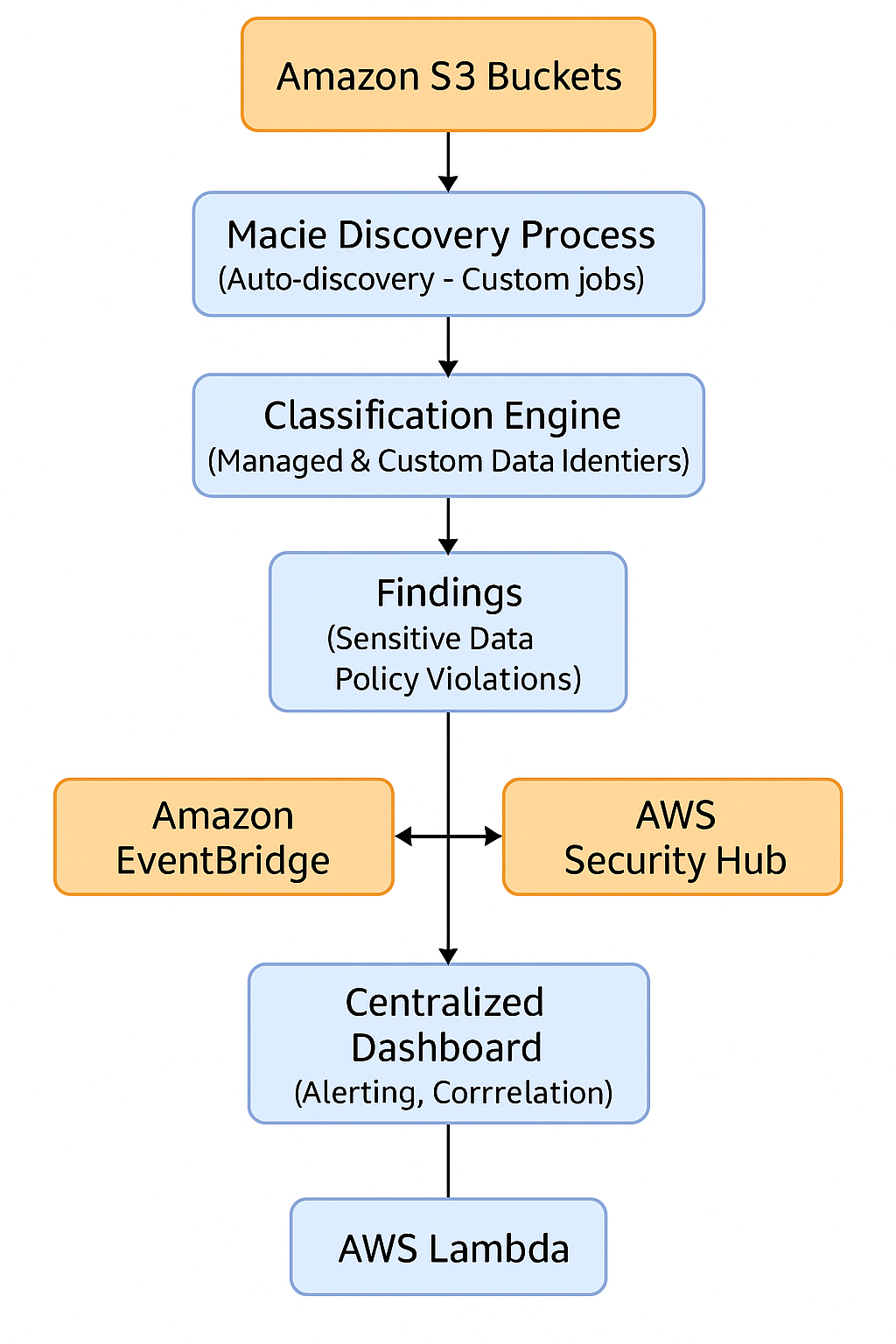
Automated Discovery
Macie maintains an inventory of general-purpose S3 buckets and evaluates their security and access configuration daily. It selects a representative sample of objects to scan, based on factors like bucket name, file extension, last modified date, and prioritizes new or recently updated objects.
Targeted Discovery Jobs
You can launch sensitive data discovery jobs, either one-time or scheduled (daily, weekly, monthly), targeting specific buckets or objects with managed or custom criteria.
Data Identifiers and Allow Lists
- Managed Data Identifiers: Over 100 built-in detectors for identifying sensitive data types such as PII, PHI, financial information, or AWS secrets.
- Custom Data Identifiers: Defined using regular expressions to detect proprietary or organization-specific data.
- Allow Lists: Lists of known safe patterns or content to ignore, minimizing false positives (e.g., test or public data).
Sensitivity Score
Macie calculates a sensitivity score for each bucket, based on the amount of sensitive data found versus total data scanned. It also assigns a qualitative label (Sensitive, Not sensitive, Not yet analyzed). This score updates automatically as objects are added, deleted, or changed.
III. Types of Sensitive Data Detected by Amazon Macie
Amazon Macie supports over 100 Managed Data Identifiers, enabling it to detect various types of sensitive data stored in S3. These identifiers are grouped into several key categories:
A. Personally Identifiable Information (PII)
These are data types that can identify a person directly or indirectly:
- Full name
- Email address
- Phone number
- Physical address
- Date of birth
- Social Security Number (SSN – USA)
- Driver’s license number
- Passport number
- National ID number
B. Protected Health Information (PHI)
Sensitive data in a healthcare or insurance context, often subject to HIPAA compliance:
- Medical record number
- Health insurance ID
- Diagnosis or treatment details
- Medical billing data
- Healthcare provider information
C. Financial and Payment Information
Relevant to PCI-DSS compliance:
- Credit/debit card number (PAN)
- CVV security code
- IBAN
- Bank account number
- Check number
- Taxpayer Identification Number (TIN)
D. AWS Credentials and Technical Data
Macie detects sensitive credentials and tokens:
- AWS Access Key ID / Secret Access Key
- Temporary session tokens
- SSH private keys
- Known API keys (Google, Stripe, Slack, etc.)
- JWT tokens
- URLs containing secrets
E. International Identifiers
Macie supports various country-specific identifiers:
| Country | Detected Identifiers |
|---|---|
| France | Social Security Number (NIR), IBAN |
| Canada | NAS, Driver’s license |
| United Kingdom | NINO, Passport number |
| Germany | Steuer-ID, IBAN |
| Japan | My Number |
| Brazil | CPF, CNPJ |
F. Other Detectable Data Types
- IP addresses (IPv4 / IPv6)
- GPS coordinates
- License plates (various formats)
- Business-specific structured strings (via Custom Data Identifiers)
Tip: Use Custom Data Identifiers to detect internal formats such as customer IDs, project codes, or proprietary tags.
G. Official Reference
🔗 Full List of Managed Data Identifiers – AWS Documentation
IV. Findings Analysis and Integration with Security Ecosystem
Findings: Types and Details
Macie produces two main types of findings:
- Policy findings: Highlighting bucket-level risks (e.g., unencrypted, publicly accessible, shared across accounts).
- Sensitive data findings: Detailed information about the sensitive data detected (type, number of occurrences, bucket, object), along with a severity level to assist with rapid triage.
Each finding includes practical metadata: tags, encryption status, access level, sample content info, and is retained for 30 days via console or API.
AWS Integrations
- EventBridge: Streams findings in real time to trigger workflows via Lambda, SNS, or third-party systems.
- AWS Security Hub: Aggregates Macie findings alongside other AWS security services for unified monitoring and automated response.
Programmatic Access
All Macie functionalities are available via AWS Console, REST API, CLI, and SDKs (Python, Java, Go, .NET…). This is ideal for automating Macie setup, scanning jobs, or integrating with infrastructure-as-code pipelines.
V. Security, Multi-Account Governance, and Best Practices
Macie Data Protection
Data stored by Macie (findings, jobs, custom identifiers, etc.) is encrypted at rest using AWS KMS (AWS-managed keys). Inter-service communications are conducted over PrivateLink/VPC endpoints to avoid public Internet exposure.
Multi-Account Management with AWS Organizations
Macie can be enabled for an entire AWS Organization, allowing a Macie admin account to centrally manage and monitor member accounts’ buckets, unify discovery settings, and aggregate results. Ensure that the service-linked IAM role has proper KMS permissions to scan encrypted objects.
Recommended Best Practices
| Recommendation | Description |
|---|---|
| Exclude certain buckets | Exclude log or test buckets to avoid false positives or unnecessary scans |
| Refine identifiers | Combine managed and custom identifiers, and use allow lists to reduce noise |
| Automate finding response | Use EventBridge + Lambda or Security Hub to auto-remediate risks like public access or missing encryption |
VI. Common Use Cases
1. Regulatory Compliance (GDPR, HIPAA, PCI-DSS)
Automatically identify PII / PHI / financial data, monitor potential exposure, and maintain traceability for audits and compliance reporting.
2. Data Migration
Before or during S3 migrations, run targeted discovery jobs to detect sensitive data transfers, and apply controls like encryption or access restriction.
3. Post-Deployment Monitoring
Continuously detect public buckets or newly added sensitive objects with real-time alerts and automated remediation via EventBridge or Security Hub.
VII. Amazon Inspector vs. Amazon Macie: Complementary AWS Security Tools
Amazon Inspector and Amazon Macie are both AWS security services, but they serve very different purposes. Inspector focuses on infrastructure security, while Macie is designed to protect sensitive data. Here’s a comparison:
| Criteria | Amazon Inspector | Amazon Macie |
|---|---|---|
| Primary Purpose | Detecting vulnerabilities in resources (EC2, Lambda, ECR) | Discovering and protecting sensitive data in S3 |
| Threat Type | System vulnerabilities, outdated packages, misconfigurations | Accidental exposure of sensitive data (PII, PHI, secrets) |
| Analyzed Sources | EC2, Lambda, container images in ECR | S3 buckets and objects |
| Methodology | Continuous CVE-based scoring with contextual awareness | Pattern matching and ML-based content classification |
| Risk Score | ✅ Yes (contextual CVSS score) | ✅ Yes (bucket sensitivity score) |
| Automation | Fully continuous | Auto-discovery + on-demand jobs |
| Typical Use Cases | Securing workload posture | Data compliance, leak prevention |
| Security Hub Integration | ✅ Yes | ✅ Yes |
| Pricing Model | Per analyzed resource | Per GB scanned and bucket evaluated |
In short, Amazon Inspector protects the container (your infrastructure), while Amazon Macie protects the content (your data). Used together, they provide complementary security coverage for any AWS environment focused on compliance and data protection.
VIII. How to Manage Managed Data Identifiers in the AWS Console
This section explains how to configure and manage Managed Data Identifiers directly in the Amazon Macie console, controlling which data types are inspected automatically or via custom jobs.
1. Accessing Discovery Settings
- Open the Amazon Macie console in your AWS region.
- In the navigation panel, go to Settings → Automated sensitive data discovery.
2. Managing Managed Data Identifiers
On the Automated sensitive data discovery page, you’ll find two tabs:
- Added to default: identifiers you manually added to the default set.
- Removed from default: identifiers you explicitly excluded.
To add or remove identifiers:
- Click Edit.
- Check or uncheck the desired Managed Data Identifiers.
- Use the search bar or sort columns to navigate easily.
- Click Save.
❗ Note: The default selection (“ALL”) includes all current and future AWS-managed identifiers automatically.
3. Using Custom Data Identifiers
Custom Data Identifiers let you detect internal formats using regular expressions and optional keyword matching.
To create a Custom Data Identifier:
- In the Macie console, go to Settings → Custom data identifiers → Create.
- Enter a name, description, regex, and optionally keywords or ignore words.
- Test the regex using the Evaluate field with a sample text.
- Define severity levels (Low / Medium / High) based on match occurrences.
- Click Submit.
Your custom identifiers will appear in the discovery configuration options and can be used in jobs.
4. Managing Allow Lists
Allow lists define patterns or exact values that Macie should ignore, useful for skipping public/test data that might otherwise be flagged.
To manage allow lists:
- On the Automated sensitive data discovery page, find the Allow lists section and click Edit.
- Check or uncheck the allow lists you want to activate.
- Save your changes.
You can also test your regex pattern with a sample.
5. Including or Excluding Specific Buckets
To exclude (or include) buckets from automated scanning:
- In the Automated sensitive data discovery section, use Remove buckets from the exclusion list or Add buckets to the exclusion list.
- Search and select the relevant buckets, then save.
6. Summary of Key Actions
| Action | Where to Do It | What Macie Does |
|---|---|---|
| Add data identifiers | Settings → Automated sensitive data discovery → Edit identifiers | Includes them in future scans |
| Create custom identifier | Settings → Custom data identifiers → Create | Enables detection of internal data patterns |
| Manage allow list | Settings → Automated sensitive data discovery → Allow lists | Skips false positives or known-safe content |
| Exclude a bucket | Settings → Automated sensitive data discovery → Exclusion list | Bucket is ignored in automated discovery |
7. Practical Notes
- Historical Findings Persist: Changes to settings do not delete existing findings — they remain visible.
- Access Control: Make sure your IAM roles have access to KMS keys and S3 resources for reviewing sample data.
- Automation Tips: Combine Macie with EventBridge, Lambda, or Security Hub to automate incident response workflows.
IX. Conclusion
Amazon Macie is a comprehensive solution for data security and privacy, purpose-built for Amazon S3. It combines automated discovery, precise classification, security integrations, and organization-wide visibility to help teams monitor and protect sensitive data effectively. Adopting Macie helps reduce exposure risks and supports compliance with data protection regulations.
🔗 Useful Resources
- AWS Official Documentation: What is Amazon Macie? – Features – Getting Started – Security
- Full List of Managed Data Identifiers – AWS Docs